

System Overview
LDSperimetral is designed to manage stadiums that have multiple LED perimeter rings or screens located at different heights. This architecture allows for the synchronized execution of content on all visual supports of the venue, regardless of their physical configuration
A key feature is the flexibility in media management: each ring can be composed of modules with different resolutions, requiring specific media for each, but maintaining perfect synchronization for the same advertiser.
Scalability and Latency
The system does not impose a limit on the number of rings to synchronize. Thanks to communication being carried out via network (preferably wired), including additional rings does not add significant delay (latency) between the execution of the first and the last.
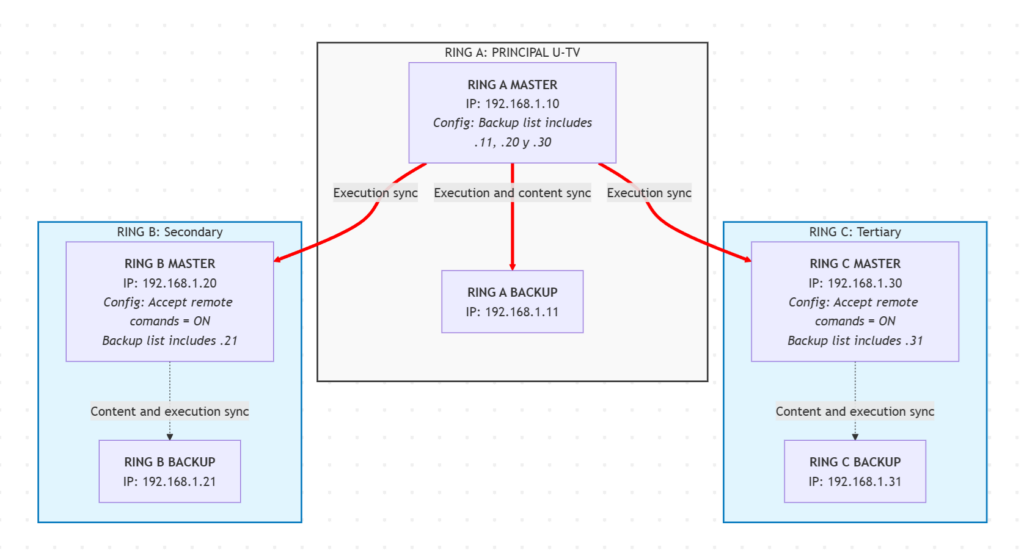
Hardware Requirements and Topology
To comply with UEFA regulations and ensure fault tolerance, each ring requires its own backup system.
Recommended Architecture per Ring
From LDS, we recommend that each ring has its own independent redundant control system. This implies the following provision per ring:
-
1 Primary Computer (Master).
-
1 Backup Computer (Backup).
Note: The detailed technical specifications for these devices can be found on the main product page of LDSperimetral.
Setup and Implementation Guide
To ensure the content is the same and simultaneous execution across all nodes, the following two-phase procedure must be followed:
Phase 1: Individual Ring Configuration with Backups
Each ring must initially be configured as an independent and redundant perimeter system.
-
Configure one device as Primary and another as Backup.
-
Ensure internal synchronization: content changes on the primary must automatically transfer to the backup.
Phase 2: Inter-Ring Synchronization
In this stage, the control hierarchy is defined. A reference system (referred to as Master) must be chosen, which will dictate which playlist and sequence to execute for the rest of the rings (referred to as Slaves).
Generally, the “Master” system is usually the field-level ring, although this is not mandatory.
Step-by-step configuration for multiple rings
For the configuration of a stadium with multiple rings, follow these steps:
Step 1: Configure each ring independently
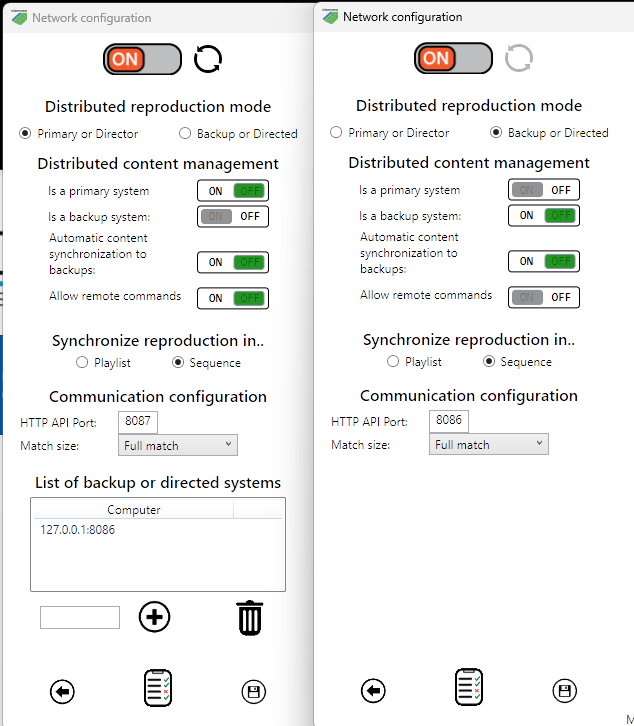
In each of the rings, follow the steps for configuring a primary and a backup system, as if it were an individual perimeter system. You can see the detailed steps for doing so in the online training course.
Step 2: Synchronize all rings with respect to the reference primary
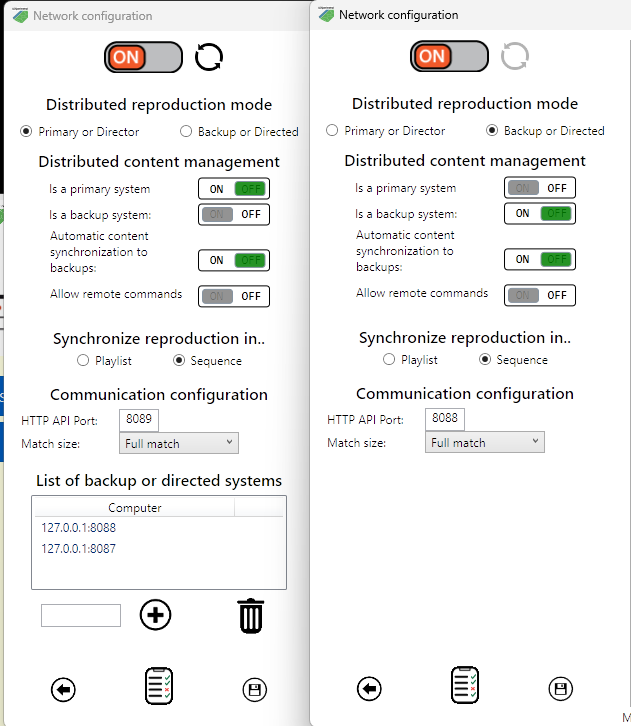
In each ring except the one you have chosen as the reference, indicate in the network configuration that it is allowed to receive remote commands. This way, the primaries of the rings will be able to receive commands from the reference primary.
In the primary system, go to the network configuration and add the primaries of each of the rings as if they were a backup system.
LED ring configuration
Content Management and Sequence and Playlist Naming
To ensure automatic synchronization, the system relies on exact name matching. When the Master system initiates a sequence, it sends a message to the network requesting the execution of a specific file.
Naming Rules
-
Exact Match: Playlists and sequences that are to be executed synchronously must have exactly the same name on all rings.
-
Error Handling: If the Master system requests a sequence that does not exist on a Secondary ring, the receiver will log an error notice in the network log, visible from the configuration panel